What crucial screen tech detail differentiates budget smartphone displays beyond resolution numbers?
The most important detail separating budget smartphone displays is often the panel technology behind the pixels, not the resolution printed on the specification sheet. Budget smartphone display technology determines how a screen produces light, handles colors, maintains visibility at an angle, and responds when displaying dark scenes. Two phones with the same resolution can therefore deliver noticeably different viewing experiences.
A 1080p screen is not automatically better than every 720p screen in daily use. Resolution describes the number of pixels, but it does not tell the whole story about contrast, brightness, color accuracy, viewing angles, or outdoor readability. Understanding LCD construction, IPS technology, and AMOLED's self-emissive design provides a more reliable way to interpret affordable phone specifications.
The Core Difference: How the Display Produces Light
The first distinction to understand is whether a display depends on a separate backlight or produces light directly from its pixels. This structural difference influences several aspects of image quality before resolution even enters the discussion.
LCD: A Backlight Illuminates the Image
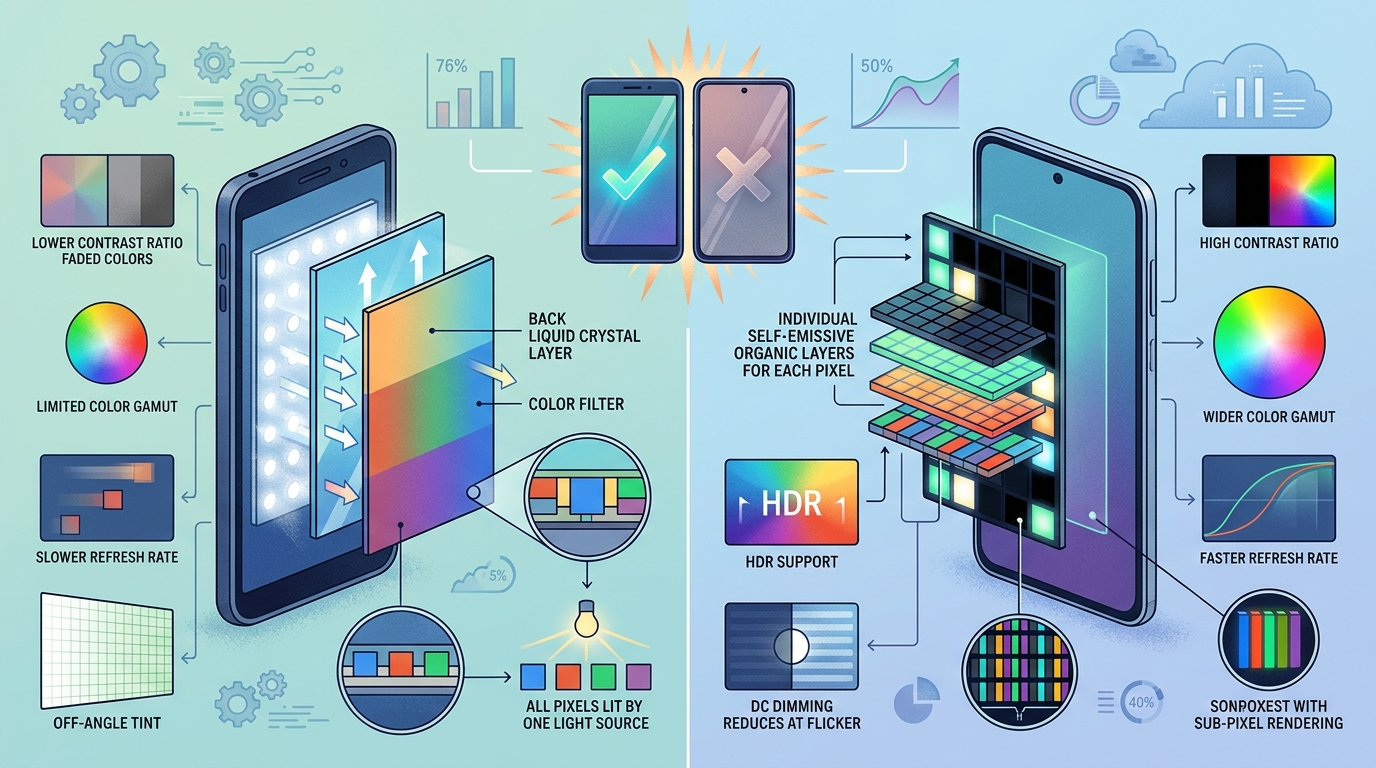
A liquid crystal display (LCD) uses a backlight to provide illumination. Liquid crystals control how much of that light passes through each pixel, while color filters create the red, green, and blue components needed to reproduce images.
Because the backlight illuminates the display as a whole, an LCD generally cannot switch individual pixels completely off in the same way an OLED panel can. Dark areas may consequently appear gray rather than truly black, especially in a dim room. Light can also leak through the panel's optical layers, reducing perceived contrast.
LCD technology remains common in inexpensive smartphones because established manufacturing methods can make it economical. Its performance, however, depends on more than the LCD label. The liquid-crystal arrangement, backlight, polarizers, color filters, and optical films all affect the final image.
IPS LCD: More Consistent Viewing Angles
In-plane switching (IPS) is a type of LCD technology. Its liquid crystals move primarily within the plane of the display, rather than relying on the same alignment behavior used by traditional twisted-nematic (TN) LCDs.
This arrangement generally helps IPS panels preserve color and contrast when viewed from the side. It is useful when several people look at a photo together, when a phone rests on a desk, or when the screen is not directly facing the user.
IPS does not guarantee perfect color reproduction or high brightness. A low-cost IPS panel can still look washed out outdoors, show uneven illumination, or reproduce colors inaccurately. The technology establishes certain design advantages, but implementation and component quality determine how well those advantages are realized.
AMOLED: Each Pixel Produces Its Own Light
Active-matrix organic light-emitting diode (AMOLED) displays use organic light-emitting materials to produce light at individual pixels. An active-matrix control system operates those pixels, allowing the screen to adjust illumination across the image.
When an AMOLED pixel displays black, it can turn off rather than trying to block a continuously illuminated backlight. This produces exceptionally deep blacks and can create very high contrast. Dark interfaces may also consume less display power when many pixels remain off, although actual savings depend on screen brightness, content, and panel design.
Older or inexpensive AMOLED implementations can have limitations of their own. Color tuning may be oversaturated, low-brightness behavior can be inconsistent, and maximum brightness varies widely between panels. Organic light-emitting materials also age over time, and prolonged display of static, bright elements can contribute to uneven wear.
Why Resolution Alone Cannot Predict Image Quality
Resolution describes how many pixels make up an image. A 1600 × 720 display contains 1,152,000 pixels, while a 2400 × 1080 display contains 2,592,000 pixels. At the same screen size, the second display can render finer details because it packs more pixels into the same area.
Pixel density, expressed in pixels per inch (PPI), is therefore useful when evaluating sharpness. Yet it remains only one part of the display experience.
Consider two smartphones with identical 1080p resolutions. One has a well-calibrated IPS panel with strong brightness and consistent viewing angles. The other uses a poorly tuned panel with a narrow usable viewing range and weak outdoor visibility. The first can provide the better everyday experience even though both screens contain the same number of pixels.
The reverse can also occur: a higher-resolution display can reveal more detail in text and images, even if another screen has better contrast. The correct conclusion is not that resolution is unimportant, but that it answers a different question from panel quality.
Color Accuracy Is Not the Same as Vividness
Color reproduction is another area where budget smartphone displays can differ substantially. Manufacturers may tune screens to appear vivid in a shop demonstration, but saturated colors do not necessarily represent the original image accurately.
A screen that makes green foliage unusually intense or turns skin tones orange may look immediately striking. However, a more restrained panel can reproduce photographs and video more faithfully.
Several terms help explain this difference:
- Color gamut: The range of colors a display can reproduce. A wider gamut can show more saturated colors, provided the content and display mode use that range appropriately.
- Color accuracy: How closely the displayed colors match their intended values. A wide gamut alone does not guarantee accuracy.
- White balance: The balance of red, green, and blue in neutral shades. Poor white balance can make white backgrounds look yellowish, bluish, or greenish.
- Gamma: The relationship between an image's signal levels and displayed brightness. Incorrect gamma can obscure shadow detail or make midtones look unnatural.
For people who mainly browse social media, watch entertainment, and read messages, a slightly imperfect color profile may be acceptable. For photo editing, design work, or judging the color of products from images, accuracy becomes more important.
Practical decision rule: If color fidelity matters, look for documented color-accuracy measurements or a well-implemented sRGB mode rather than relying on phrases such as vivid, cinematic, or rich color. If specifications provide only a gamut percentage, treat that figure as evidence of color range, not proof of accuracy.
Brightness and Outdoor Readability Depend on More Than Nits
Brightness is usually expressed in nits, also called candelas per square meter (cd/m²). A higher figure can help a display remain legible in bright surroundings, but advertised maximum brightness requires careful interpretation.
Some specifications describe typical manual brightness, while others advertise peak brightness achieved only under particular conditions. A peak figure may apply to a limited portion of the display, a short period, or a special automatic-brightness mode. It should not be assumed that the entire screen can sustain that level continuously.
Outdoor readability also depends on reflections. A glossy screen with strong reflections can be harder to read than expected, even if its nominal brightness is high. Optical bonding, cover-glass properties, coatings, and the distance between display layers can influence how much ambient light interferes with the image.
Automatic brightness behavior matters as well. A phone may reach a high brightness level in direct sunlight but remain relatively dim when adjusted manually. Another may offer a less impressive peak rating but provide a useful sustained brightness level during ordinary outdoor use.
When published information is limited, prioritize clearly defined brightness measurements over a single marketing maximum. If outdoor navigation and reading are frequent activities, sustained brightness and reflection control deserve particular attention.
Viewing Angles Reveal Differences That Resolution Hides
Viewing angles describe how a display changes when the viewer moves away from a straight-on position. A weak panel may lose contrast, shift toward a different tint, or make dark details harder to distinguish when tilted.
IPS LCD panels generally offer good off-axis consistency compared with traditional TN LCDs. AMOLED panels also commonly provide broad viewing angles, although the exact behavior depends on their construction and optical layers. Neither technology guarantees identical performance across all price levels.
This characteristic matters in ordinary situations. A person reading while a phone rests on a table may see a different image from someone holding it directly in front of their face. Navigation, shared photos, and video playback can also expose shifts in color and contrast.
There is an important exception: a screen that looks excellent straight on may still be perfectly adequate for someone who always holds the phone at a consistent angle. Wide viewing angles are a meaningful benefit, but they are not equally valuable to every user.
Older AMOLED and Low-Cost LCD Panels Have Different Trade-Offs
It is tempting to classify all AMOLED screens as premium and all LCD screens as basic. That distinction is too simple. Display quality depends on the specific panel generation, component selection, tuning, and implementation.
An older AMOLED panel can deliver excellent blacks but fall short of a newer LCD in some other respects. Depending on the design, it may have lower full-screen brightness, less accurate factory calibration, or noticeable color changes at certain viewing angles. Its power consumption can also rise when displaying large bright areas, since more pixels must emit light.
A well-designed LCD can provide consistent white backgrounds, natural-looking colors, and practical brightness at an affordable cost. Its disadvantages may include weaker black levels, backlight bleed, or lower contrast in dark environments.
LCD subtypes should not be confused with complete quality ratings. IPS identifies a liquid-crystal arrangement; it does not specify the panel's maximum brightness, refresh rate, contrast, or calibration. Likewise, AMOLED identifies a self-emissive display architecture, not a guarantee of superior performance in every category.
Other implementation details matter too. Some inexpensive OLED panels use arrangements of red, green, and blue subpixels that differ from conventional RGB LCD layouts. Depending on pixel density and subpixel structure, fine text can exhibit different edge characteristics even when nominal resolutions match. Pixel density alone may not fully describe perceived text sharpness.
Refresh Rate, Response Time, and Flicker Add Another Layer
Panel technology is crucial, but motion performance also shapes the user experience. Refresh rate, measured in hertz (Hz), indicates how often the display can update each second. A 90 Hz or 120 Hz screen can make scrolling and supported animations appear smoother than a 60 Hz display.
However, refresh rate does not directly measure how quickly individual pixels change state. Response time describes pixel transitions, while motion clarity also depends on frame delivery, persistence, and the behavior of the content itself. A high-refresh-rate budget phone may still show blur or ghosting if pixel transitions are slow.
OLED and LCD panels can exhibit different transition characteristics, but there is no universal rule that every OLED responds better in every situation. Panel tuning and the specific transition being measured matter.
Flicker is another consideration. Some OLED displays regulate brightness using pulse-width modulation (PWM), which varies the duration of light output over time. Certain LCD implementations can also flicker, and methods vary by device and brightness setting. People who are sensitive to flicker may find a particular screen uncomfortable even when its resolution, colors, and brightness are otherwise satisfactory.
There is no single refresh-rate or flicker specification that fully predicts individual comfort. If a phone will be used for long reading sessions, display behavior at low brightness can be as relevant as headline specifications.
Practical Checklist for Interpreting Display Specifications
Use the following checklist to separate useful technical information from incomplete marketing claims. It focuses on the display characteristics themselves rather than on choosing a particular phone or price category.
- Identify the panel type: determine whether the screen is LCD, IPS LCD, AMOLED, or another specified technology.
- Check the resolution and screen size together: use both to understand pixel density instead of comparing pixel counts alone.
- Look for brightness conditions: distinguish peak brightness from typical or sustained brightness and check whether automatic mode is required.
- Investigate color behavior: look for documented color coverage, color modes, white balance, or accuracy measurements rather than relying on saturation claims.
- Consider viewing-angle performance: establish whether colors and contrast remain consistent when the screen is tilted.
- Check the refresh rate and its operating modes: a high maximum does not mean the screen operates at that rate continuously.
- Consider low-brightness behavior: if the phone will be used in a dark room, flicker characteristics and minimum brightness may be relevant.
- Look beyond the panel label: optical bonding, surface reflections, and manufacturing consistency can influence perceived quality.
- Separate measured specifications from assumptions: if a manufacturer does not publish a characteristic, do not infer a favorable result from the technology name alone.
Warning: Do Not Treat Every Display Number as Directly Comparable
Important caution: A specification such as 1,000 nits, 100% color gamut, or 120 Hz can describe a limited operating condition rather than consistent everyday performance. Without a clear measurement method, two advertised numbers may not be comparable.
Peak brightness may use a small highlight area, gamut coverage does not establish color accuracy, and refresh rate does not measure response time. Even contrast figures can be difficult to compare when manufacturers use different measurement methods or test conditions.
Use numbers to answer the specific question they measure. When test conditions are missing, treat the specification as incomplete evidence rather than a definitive ranking of screen quality.
Frequently Asked Questions
1. Is IPS LCD better than a standard LCD?
IPS is itself an LCD technology, not a separate category outside LCD. Compared with traditional TN LCDs, IPS generally offers more consistent viewing angles and color behavior. The actual quality of an IPS panel still depends on brightness, contrast, calibration, and construction.
2. Is AMOLED always better than IPS for budget smartphones?
No. AMOLED generally provides deeper blacks because individual pixels can switch off, and it can deliver very high contrast. An IPS display may still offer better results for a particular use if its brightness, calibration, and viewing behavior are superior. The panel's implementation matters more than the label alone.
3. Can a 720p screen look better than a 1080p screen?
Yes, in some respects. A 1080p display generally provides more detail at the same screen size, but a 720p screen can still have more accurate colors, better contrast, or higher useful brightness. If small text and fine detail are the priority, resolution matters more; if outdoor visibility or dark-scene contrast is the priority, other characteristics may matter more.
4. Why do some AMOLED screens look oversaturated?
Manufacturers may use a vivid color profile that increases saturation beyond the original content. A wide color gamut can also make colors appear more intense when color management is not handled appropriately. A natural or sRGB-oriented display mode, when available, may provide a more restrained and accurate image.
5. Does a higher brightness rating guarantee better outdoor readability?
No. Brightness is important, but reflections, sustained output, automatic-brightness behavior, and ambient lighting all affect readability. A peak figure achieved briefly or over a small screen area does not necessarily represent normal full-screen performance.
6. Does a 120 Hz display automatically look better than a 60 Hz display?
Not in every respect. A higher refresh rate can make supported scrolling and animations appear smoother, but it does not automatically improve resolution, color accuracy, black levels, or brightness. Response time and software behavior also influence perceived motion quality.
7. Can an LCD produce true black?
Conventional backlit LCDs generally cannot turn off individual pixels independently, so some backlight illumination may remain visible in dark areas. Local-dimming systems can improve black levels by controlling backlight zones, but they are not equivalent to switching off each pixel individually. OLED-based panels can produce black by turning off the relevant pixels.
8. Which display characteristic matters most for reading and messaging?
For reading and messaging, adequate brightness, comfortable low-brightness behavior, legible text, and suitable pixel density are important. If the phone is frequently used outdoors, sustained brightness and reflection control deserve extra attention. A higher refresh rate may improve scrolling smoothness, but it is not a substitute for readable text and a comfortable display.
Conclusion: Judge the Screen by Its Behavior, Not Its Pixel Count
The central distinction in budget smartphone display technology is how the panel creates and controls light. LCD panels use a backlight and liquid crystals, IPS designs generally improve viewing-angle consistency, and AMOLED panels illuminate individual pixels to achieve deep blacks and high contrast. These structural differences explain why displays with similar resolutions can produce noticeably different images.
Resolution remains relevant when fine detail and text sharpness matter, but it cannot independently predict color accuracy, outdoor readability, viewing angles, motion performance, or visual comfort. Brightness figures, gamut claims, and refresh rates also require context before they can be compared meaningfully.
The most useful approach is to match the technical characteristic to the real-world requirement. If dark-scene contrast is the priority, pixel-level illumination is a meaningful advantage. If consistent side viewing or natural-looking backgrounds matter more, inspect the actual LCD or AMOLED implementation. If outdoor use dominates, prioritize sustained brightness and reflection control. When a specification is missing, recognize the uncertainty rather than assuming that a familiar panel label guarantees quality.
Ultimately, a budget display should be understood as a combination of panel architecture, optical construction, calibration, and operating behavior. Looking beyond resolution reveals the details that most directly influence how clear, comfortable, and faithful the screen appears in everyday use.


Comments
Post a Comment